
How to Pull Satellite Images From Docker Hub on an Offline Kubernetes Deployment
Starting with Pyramid version 2025.02.222, the cluster infrastructure has been updated. The Runtime Engine (RTE) and Task Engine (TE) now utilize separate Satellite pods rather than running inside their respective containers.
For clusters with internet access, the RTE and TE deployments pull these Satellite images automatically without requiring any changes to your YAML files or Helm charts.
If your cluster's internet access is blocked, you must manually pull these images to your internal registry.
The images can be found in this registry:
https://hub.docker.com/r/pyramidanalytics/satellite/tags
To allow the pods to successfully pull the Satellite images from your internal registry, you will need to apply the following configuration steps based on your deployment method.
Option 1: Using YAML
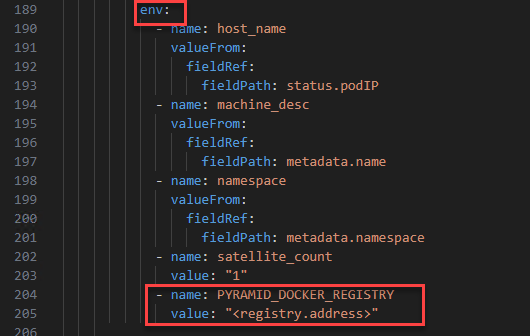
In the runtime-service and task-service deployment files, locate the env block and append the PYRAMID_DOCKER_REGISTRY variable:
YAML
env:
  - name: PYRAMID_DOCKER_REGISTRY
    value: "<your.registry.address>"
(Note: Replace <your.registry.address> with the actual URL of your internal registry).
Option 2: Using Helm
If you are managing your deployments via Helm, ensure your registry is defined in your values.yaml file (e.g., as repo).
Then, update the rte_deployment and te_deployment templates by adding the following to the env block:
YAML
env:
  - name: PYRAMID_DOCKER_REGISTRY
value: "{{ .Values.repo }}"Reply
Content aside
- 4 mths agoLast active
- 259Views
- 1 Following