Filtering a list including quotation marks
I have a field -- let's say "sales_note" -- which has more than one hundred thousand distinct values over more than one million rows of data.
I need to create a filter such that 1,430 specific sales_note are included, and all others are excluded. A number of these notes that I want to include have quotation marks in their name (eg CUST "NOT READY" FOR NEW). When I try to filter this in a List formula using an EQUALS block, I get the following error:

"symbol error NOT Line, position 66"
I have tried to use a backslash (CUST \"NOT READY\" FOR NEW) with no luck. Replacing the quotation marks with apostrophes resolves the error but does not return the result, as CUST 'NOT READY' FOR NEW is a distinct string from what I am trying to include. There are other similar notes (eg CUST "READY" FOR NEW", CUST "ALMOST" READY, NOT READY YET) which I don't want to include; their similarity precludes me from trying to filter using a CONTAINS substring, because there is no substring of the desired code that excludes the quotation marks and does not overlap with unwanted notes.
How can I make sure that I include the notes I want and exclude all others?
1 reply
-
Hi,
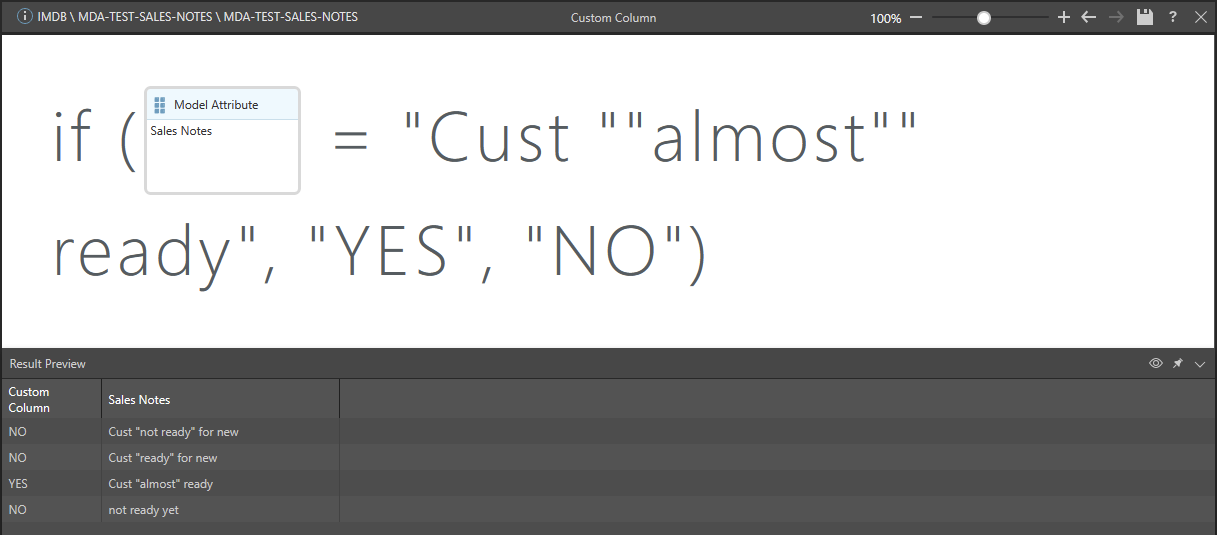
double quotation marks should do the trick, i.e. use another quotation mark instead of the backslash to "mask" the quotation mark within the name. At least for Custom Columns it worked like a charm: