
0

Dynamic Caption For Measure
Was wondering if there is any way for the caption for the measure to change depending on the column. For example, with how the sample discover is looking, we want the caption if it is under "Imcumbents" to be called "Imcumbents Sales" and then for the New Comers" it be called "New Comers Sales"
3 replies
-
Look at Dynamic Captions - perhaps this is what you're after.
-
Hi
Not really, the dynamic caption is evaluated before the query is ran - so it this won't work.
What you can try is creating 2 measures: Incumbents Sales will be:if( [Manufacturers].[Manufacturer Grouping].currentmember is [Manufacturers].[Manufacturer Grouping].[Incumbents], [measures].[SalesData Sales] ,NULL)and the second can be "New Comers Sales":
if(
    [Manufacturers].[Manufacturer Grouping].currentmember is [Manufacturers].[Manufacturer Grouping].[New Comers],
     [measures].[SalesData Sales],
    NULL
)
This way one of them will be NULL and therefore hidden for each manufacturer grouping:
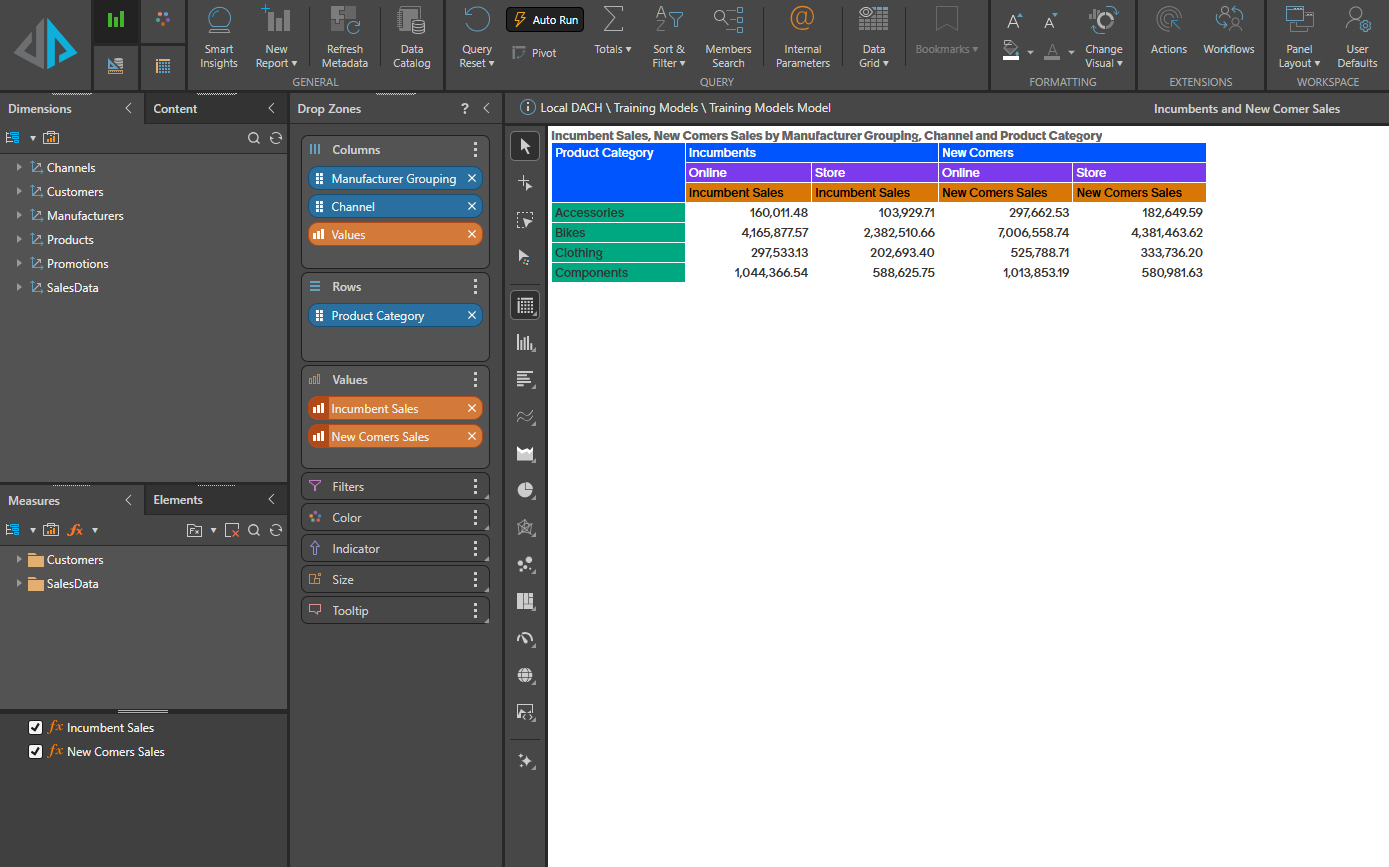
See attached PIE file as well.
I hope this helps