
How to configure Dashboard slicers to work with Tabulate slicers?
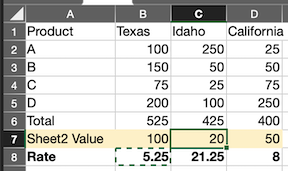
I have a tabulate that contains 2 discovers, both filtered by a date. I grab one of the rows from the second discover and place it at the bottom of the first sheet and create some calcs.
Here is a simplified example:
Rows 1-5 are from Discover 1
Row 6 is a simple Sum Total
Row 7 is coming from Discover 2 on sheet2
Row 8 is Row 6 divided by Row 7
This part is working as expected. I can change the slicer and it returns the correct data. The problem is when I drop it in a dashboard. The slicer in the dashboard, which I pulled from the Tabulate, is not changing the data even though the breadcrumb is showing that the value is being passed in. I’m sure it is something I missed in configuring either the slicer in Tabulate or the Visual Area. Do I need to create parameters? Should I not include a slicer in the tabulate? How do I get the dashboard and tabulate to communicate?
4 replies
-
I have confirmed that the slicer used in Tabulate is a parameter, so I'm not sure if that makes a difference. In the dashboard, it does show that the slicer is being passed to the parameter, according to the Interaction Manager.
-
Hi , thanks for the detailed write-up. Our team is looking into this and will follow up with you shortly. Appreciate your patience!
-
Hi Jason,
can you elaborate more on the tabulate set up? in both sheets - the discovery was added as formulas or direct? is the date filter created inside the tabulate or did it come attached to a discover?
in case of the formulas, the slicer name should be part of the formula for it to filter the formula and in the interaction manager on the storyboard - you should point it to the "parameter selection" that is in fact the slicer inside the tabulate.
Thanks.