
Recurring pyramidPrinter startup failure on Ubuntu 20 after application updates
Hi!
We are experiencing a recurring issue that is consistently reproducible in versions 2024.X and 2025.X in our environment running Ubuntu 20.
Steps to reproduce:
- We update the application version on the environment.
- After startup, the application fails to launch the internal pyramidPrinter process
- The following error appears every second in the logs: "Can't create process at schedule." (full error text and screenshot are provided below).
- As a result, the export and print functionalities become completely unavailable.
Temporary workaround:
To resolve this issue, we perform the following manual steps in the terminal:
- sudo apt-get update
- sudo apt-get install -y libpangocairo-1.0-0 libx11-xcb1 libxcomposite1 libxcursor1 libxdamage1 libxi6 libxtst6 libnss3 libcups2 libxss1 libxrandr2 libgconf-2-4 libasound2 libatk1.0-0 libgtk-3-0 libgbm1 libxshmfence-dev
- Navigate to /opt/Pyramid/core/prt/puppet and execute: sudo chmod 777 pyramidPrinter
- Navigate to /opt/Pyramid/core/prt/puppet/chromium and execute: sudo chmod 777 chrome
- Return to /opt/Pyramid/core/prt/puppet/ and execute: ./pyramidPrinter --tabs=1 --port=3002
Once the PUPPET-INITIALIZED message appears, press Ctrl-C. - Restart the Task Engine service either via the web interface or by command: sudo systemctl restart pyramidTE
This approach is highly inconvenient and poses a critical blocker for us: all manual changes must be reapplied after every single application update, and during these actions, the affected functionality becomes unavailable.
Are there any other ways to resolve this issue permanently?
Full error text and screenshot:
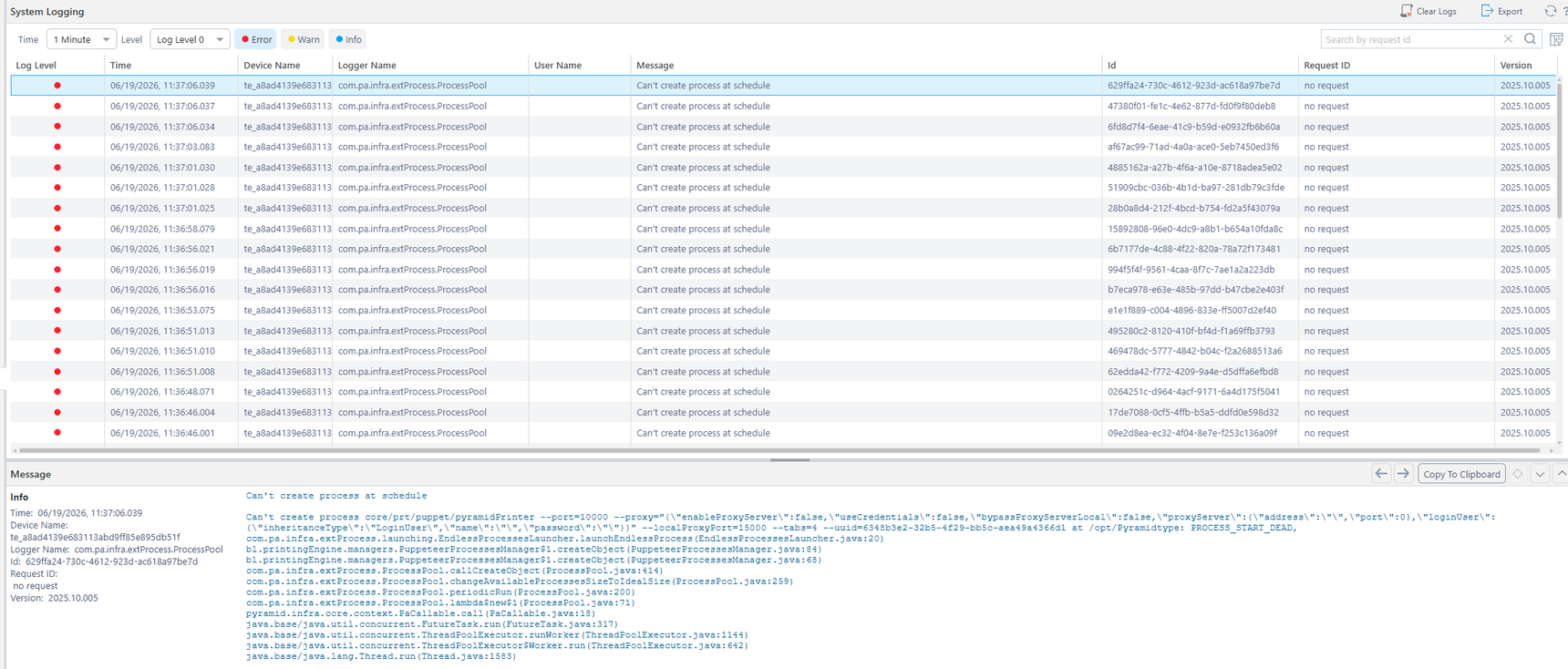
"Can't create process at schedule
Can't create process core/prt/puppet/pyramidPrinter --port=10000 --proxy="{\"enableProxyServer\":false,\"useCredentials\":false,\"bypassProxyServerLocal\":false,\"proxyServer\":{\"address\":\"\",\"port\":0},\"loginUser\":{\"inheritanceType\":\"LoginUser\",\"name\":\"\",\"password\":\"\"}}" --localProxyPort=15000 --tabs=4 --uuid=df777382-4f10-4bb8-8b85-a61976041d8d at /opt/Pyramidtype: PROCESS_START_DEAD,
com.pa.infra.extProcess.launching.EndlessProcessesLauncher.launchEndlessProcess(EndlessProcessesLauncher.java:20)
bl.printingEngine.managers.PuppeteerProcessesManager$1.createObject(PuppeteerProcessesManager.java:84)
bl.printingEngine.managers.PuppeteerProcessesManager$1.createObject(PuppeteerProcessesManager.java:68)
com.pa.infra.extProcess.ProcessPool.callCreateObject(ProcessPool.java:414)
com.pa.infra.extProcess.ProcessPool.changeAvailableProcessesSizeToIdealSize(ProcessPool.java:259)
com.pa.infra.extProcess.ProcessPool.periodicRun(ProcessPool.java:200)
com.pa.infra.extProcess.ProcessPool.lambda$new$1(ProcessPool.java:71)
pyramid.infra.core.context.PaCallable.call(PaCallable.java:18)
java.base/java.util.concurrent.FutureTask.run(FutureTask.java:317)
java.base/java.util.concurrent.ThreadPoolExecutor.runWorker(ThreadPoolExecutor.java:1144)
java.base/java.util.concurrent.ThreadPoolExecutor$Worker.run(ThreadPoolExecutor.java:642)
java.base/java.lang.Thread.run(Thread.java:1583)"
1 reply
-
Hi
If you think this is a bug, please open a ticket through support@pyramidanalytics.com.
Thanks,
Ian