
How to calculate "New vs Existing Buyers" with dynamic slicer context in PQL?
Hi everyone,
I'm building a product launch dashboard and struggling with PQL filter context. I need to calculate several "New vs Existing Buyers" metrics that require comparing two different time periods while respecting slicer selections.
My data structure:
panelist_id- unique buyer identifiersupplier,brand,sub_brand- supplier hierarchyclass,category,sub_category- product hierarchyperiod_type- 'LAUNCH' or 'COMPARISON'is_launch_product- TRUE/FALSEsales_amount- measure
The metrics I need to build:
1. New Buyers % by Supplier/Brand/Sub_brand:
- A panelist is "existing" if they bought from the supplier/brand/sub_brand in COMPARISON period (excluding launch product)
- A panelist is "new" if they did NOT buy from the supplier/brand/sub_brand in COMPARISON period
- Formula: Count of new panelists / Count of all launch buyers
- Must work dynamically with slicers on supplier OR brand OR sub_brand OR Class Or Category Or Sub Category
2. New Buyers % by Class/Category/Sub_category:
- Same logic but for product hierarchy
- A panelist is "existing" if they bought from the class/category/sub_category in COMPARISON period (excluding launch product)
- A panelist is "new" if they did NOT buy from the class/category/sub_category in COMPARISON period
- Must work dynamically with slicers on class OR category OR sub_category
The problem:
When I use Filter(AllMembers([panelist_id]), ...), the slicer context is completely ignored inside the Filter.
What I tried:
-- New Buyers (using Except)
Count(
    Except(
        Filter(
            AllMembers([table].[panelist_id]),
            ([measures].[sales_amount], [table].[is_launch_product].[true], [table].[period_type].[LAUNCH]) > 0
        ),
        Filter(
            AllMembers([table].[panelist_id]),
            ([measures].[sales_amount], [table].[period_type].[COMPARISON]) > 0
        )
    )
)
/
Count(
    Filter(
        AllMembers([table].[panelist_id]),
        ([measures].[sales_amount], [table].[is_launch_product].[true], [table].[period_type].[LAUNCH]) > 0
    )
)
Expected result: When supplier slicer = "Tnuva", the second Filter should return panelists who bought from Tnuva in COMPARISON (24 panelists).
Actual result: The second Filter returns ALL panelists who bought anything in COMPARISON (41 panelists), ignoring the supplier slicer entirely.
Other attempts that didn't work:
CurrentMember([supplier])in the tuple - still ignoredNonEmpty()- didn't respect slicer context- Nested
Sum(AllMembers([brand]), Sum(AllMembers([sub_brand]), ...))- didn't work Intersect()instead ofExcept()- same problem
Verified in SQL:
-- This returns the correct numbers:
-- Total launch buyers: 28
-- Existing buyers (same supplier): 24
-- New buyers: 4 (14.3%)
My questions:
- Is there a way in PQL to make a nested Filter() respect the current slicer context? Something equivalent to DAX's CALCULATE with KEEPFILTERS?
- If not possible with a single measure, what's the recommended approach?
- Separate measures per hierarchy level (6 measures)?
- Pre-calculate in database?
- Is there a function I'm missing that can "inject" the current slicer selection into a Filter?
Thanks for any help!
1 reply
-
Hi ,
Our team is looking into it.
My first advice to you - build it in steps:create a list:
Filter(
            AllMembers([table].[panelist_id]),
            ([measures].[sales_amount], [table].[is_launch_product].[true], [table].[period_type].[LAUNCH]) > 0
        )
Put this list into a discover on the rows, and filter by supplier. Did you receive only the new buyers for the supplier?
If so - Do the same with:Except( Filter( AllMembers([table].[panelist_id]), ([measures].[sales_amount], [table].[is_launch_product].[true], [table].[period_type].[LAUNCH]) > 0 ), Filter( AllMembers([table].[panelist_id]), ([measures].[sales_amount], [table].[period_type].[COMPARISON]) > 0 ) )Another approach may be to try parameters.
Create a parameter on the SUpplier/Brand/SUb-brand hierarchy.
Put it inside your calculations.Count( Except( Filter( AllMembers([table].[panelist_id]), ([measures].[sales_amount], [table].[is_launch_product].[true], [table].[period_type].[LAUNCH] ,[Spplier-Brand-hierarchy].@[param GUID]) > 0 ), Filter( AllMembers([table].[panelist_id]), ([measures].[sales_amount], [table].[period_type].[COMPARISON],[Spplier-Brand-hierarchy].@[param GUID]) > 0 ) ) ) / Count( Filter( AllMembers([table].[panelist_id]), ([measures].[sales_amount], [table].[is_launch_product].[true], [table].[period_type].[LAUNCH] ,[Spplier-Brand-hierarchy].@[param GUID]) > 0 ) )This should work.
If you then want to use other measures as well - use the parameter on the columns (you can use it as a filter but it will be harder to incorporate in a present):
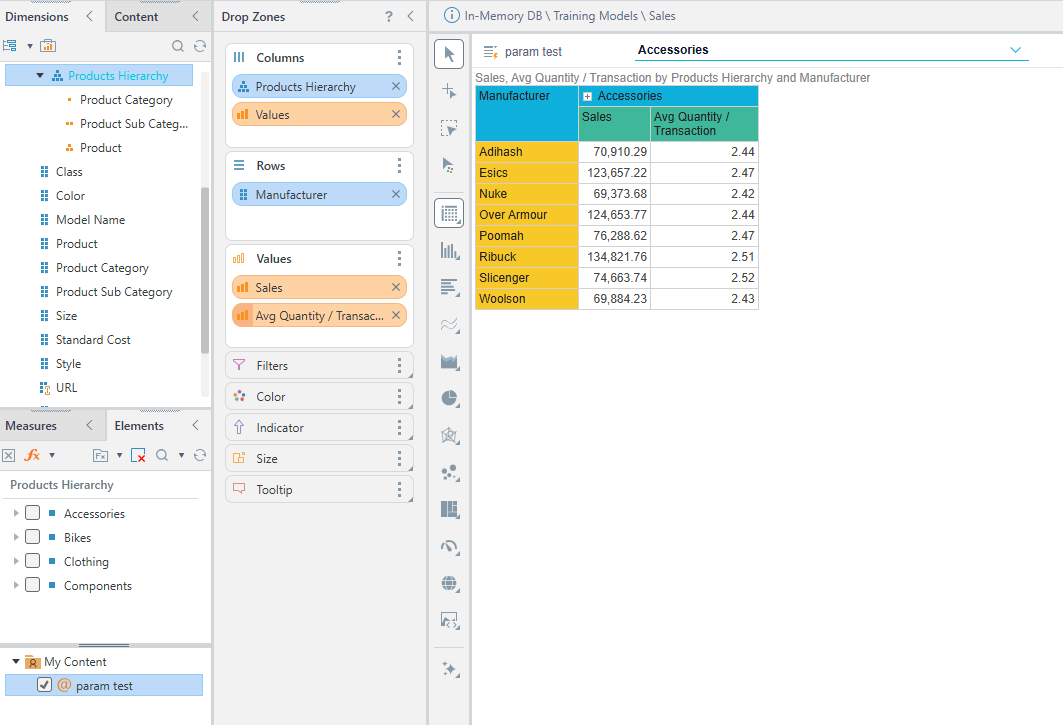
Notice in a discover you can't use a tree slicer of a parameter but in a Present you can create a tree slicer and set the interaction to feed it.