
Dynamic “initial price” driven by a user-selected date filter
How do I calculate a dynamic “initial price” driven by a user-selected date filter?
Background
I have a receiving ledger with a few million rows of receiving entries. Each row contains the usual fields:
· Purchase order number
· Part number
· Received date
· Unit price
· Received quantity (QTY)
Goal
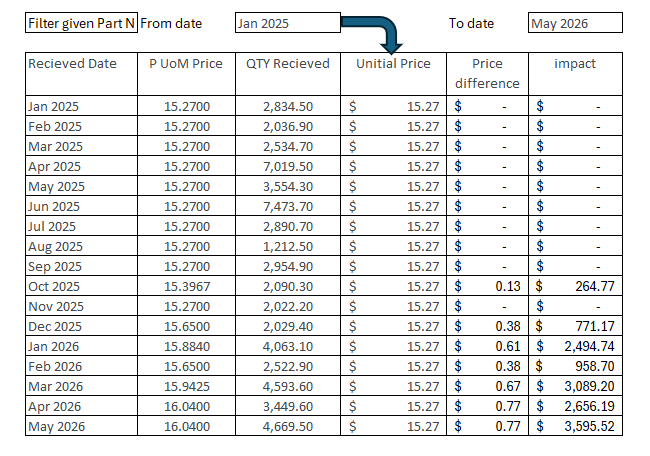
I want to track price changes for each part and the resulting dollar impact over a user-selected time period. In the discovery, the user picks a start period and an end period based on the Received date.
How the calculation should work
The base (initial) price is the first price paid for a given part on or after the selected start period. Any later price change is shown as a delta from that initial price:
Price difference = Current price − Initial price
The dollar impact is then weighted by the received quantity:
$ Impact = Received QTY × Price difference
What I’ve tried
I can build every calculation without trouble except for selecting the initial price based on the user’s filter selection. Using a Lag or a previous member approach does not reproduce the result I’m after, because the initial price needs to be anchored to the first record within the selected window rather than the immediately preceding row. Moreover, it should consider any other filter in the discover, such as the Part number selected.
My question
How can I create a variable initial price that is driven by the date range the user selects on a filter — i.e., the first unit price per part within the chosen start/end period — so the delta and impact recalculate as the filter changes?
Thank you
DG
6 replies
-
I believe this will work:
In the semantic/data modeler in "Model", right click on the "initial price" column and change the metric to "First child."
Redeploy the model and it should be done.
-
Hi
Notice: I have attached the data set and a PIE file with all relevant items – models, formulates, discoveries, etc. So you can try it yourself.
Before we start, let’s create a model that has a hierarchy of dates (Year – Quarter –Month Date) with relevant data (see attached with data set).
Let’s Explain in words what it is we want to achieve:
select a period
find the earliest date in this period in which an item was sold
set this as the base price for comparisons.
Create a calculation that measures growth compared with that base price
Let’s break it into steps:
select a period
This quite literally implies that we need a Parameter in the Sale Date Hierarchy to choose from. Let’s create it:
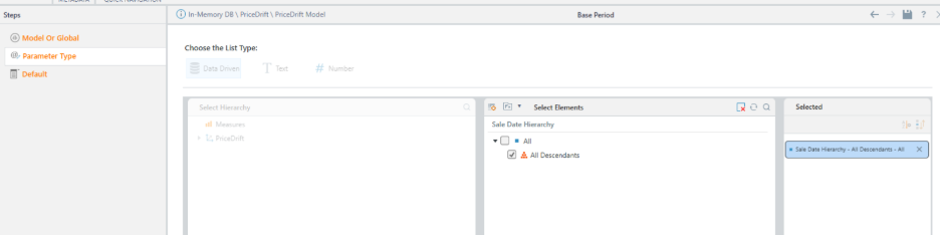
(call it Base Period)
find the earliest date in this period in which an item was sold:
Let's break this even further down:
We need to find all the dates in the parameter, where the current item was sold, or in PQL:
NonEmpty(
      LeafDescendants([PriceDrift].^[PriceDrift Date Hierarchy].@[Parameter uuid])
      ,([PriceDrift].[PartName].currentmember,[measures].[PriceDrift UnitPrice])
)
The LeafDescensants() function will return all the dates of the selected parameter.
The nonempty() will only return dates that have a Unit Price.
The [PriceDrift].[PartName].currentmember ensures the set is evaluated for each part seperately.
Next, we want the first of these dates – that's done using the First Element() function:
FirstElement(
NonEmpty(
     LeafDescendants([PriceDrift].^[PriceDrift Date Hierarchy].@[Parameter uuid])
     ,([PriceDrift].[PartName].currentmember,[measures].[PriceDrift UnitPrice]))
)
Next, we want to create a data point of the above with the unit price measure:
(
FirstElement(
NonEmpty(
     LeafDescendants([PriceDrift].^[PriceDrift Date Hierarchy].@[Parameter uuid])
     ,([PriceDrift].[PartName].currentmember,[measures].[PriceDrift UnitPrice]))
),
[measures].[PriceDrift UnitPrice]
)
This will be our Base Price Measure – be sure to use the measures in the context.
Create a calculation that measures growth compared with that base price
That’s straight forward – unit price – base price:
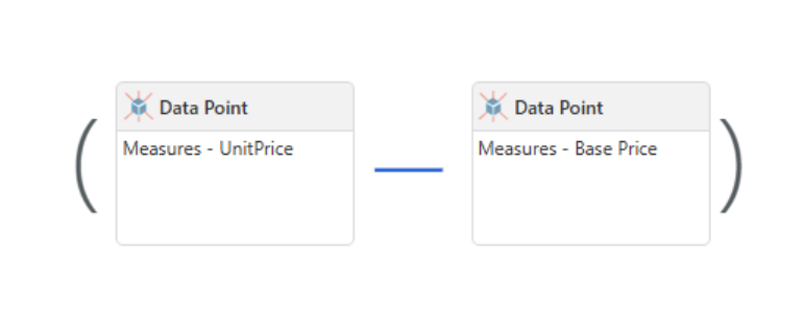
Let’s call that “Price Drift”
Create Discovers
Now we can create a discover showing base price, unit price, and price drift.
Once we select Base Price – The parameter will appear in the discover.
Next we can use a multi select tree slicer to select the periods that will be shown in the discover, and of course a filter for the parts, to receive:
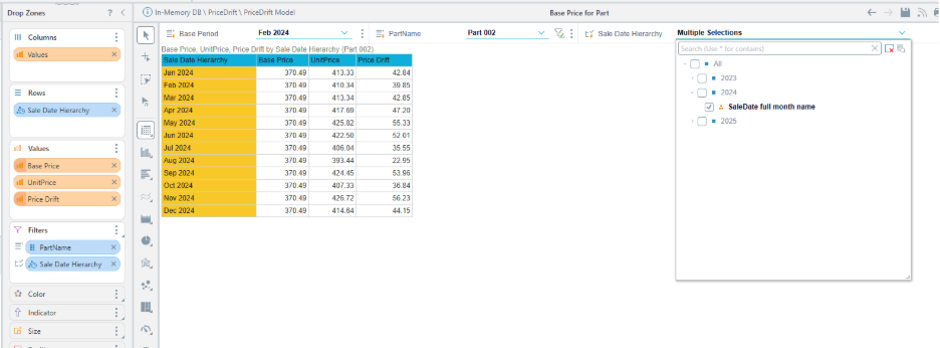
Or we can put the part on the rows to receive a matrix:
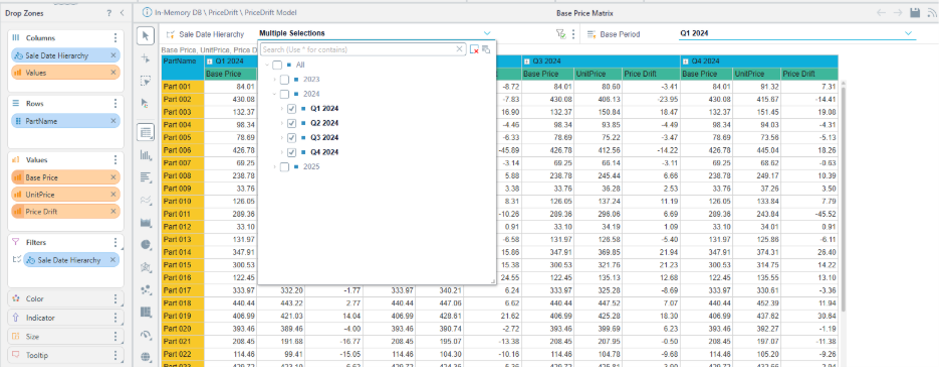
This works well just notice the matrix creates A lot of queries, so depending on how much data you have you will want to be careful with it.
Also – Avoid multi select filter for the parts – as the CurrentMember will not work with multiple selections.