Formula for measure filtered by a dimension
I have the fact and dimension tables below:
SourceType dimension
· SourceType 1
· SourceType 2
· SourceType 3
· SourceType 4
Event fact
· Count of events
I would like to
1) create a formula which calculates the count of events for all SourceTypes except for SourceType 3.
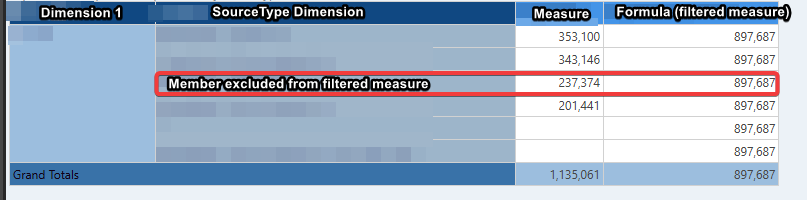
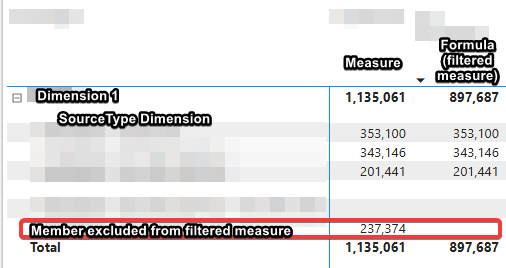
2) create a pivot table which uses the above created formula to display the count of events by SourceType, excluding SourceType 3
|
Count of events no sourcetype 3 |
SourceType 1 |
3 |
SourceType 2 |
4 |
SourceType 4 |
6 |
3) use the formula with any other connected dimension
4) if any other SourceTypes are added in the future, they would be included (in other words, need to use Except)
I created a list in Formulate as
{Except(AllMembers([SourceTypesTable].[SourceTypes]),[SourceTypesTable].[SourceTypes].[SourceType 3])}
And then used this list in another formula
Aggregate({[SourceTypeTable].[SourceType].*[272cf8c2-2350-4c51-bcd0-730258cbef37]},([measures].[EventsTable Events]))
This achieved #1 and #3 but not #2.
Thanks for the help.
6 replies
-
Hi Michael,
Sounds like you're pretty close so far. Would you be able to provide a screenshot of what you have in Discover, so I can see what you're missing?
My initial thought is that you don't need to Aggregate in your formula. If all you're trying to do is have a scalable list that removes a single element (SourceType3), then your list should do the heavy lifting and you can drop in your measure for the counts. -
Ahh thanks for the visual and extra context - I see what you're looking for now. Looks like Imbar has you covered, but let us know if you need anything else.