0

Formula for measure filtered by a dimension

I have the fact and dimension tables below:

SourceType dimension

·         SourceType 1

·         SourceType 2

·         SourceType 3

·         SourceType 4

Event fact

·         Count of events

I would like to

1)      create a formula which calculates the count of events for all SourceTypes except for SourceType 3. 

2)      create a pivot table which uses the above created formula to display the count of events by SourceType, excluding SourceType 3


Count of events no sourcetype 3

SourceType 1

3

SourceType 2

4

SourceType 4

6


3)      use the formula with any other connected dimension

4)   if any other SourceTypes are added in the future, they would be included (in other words, need to use Except)


I created a list in Formulate as

{Except(AllMembers([SourceTypesTable].[SourceTypes]),[SourceTypesTable].[SourceTypes].[SourceType 3])}


And then used this list in another formula

Aggregate({[SourceTypeTable].[SourceType].*[272cf8c2-2350-4c51-bcd0-730258cbef37]},([measures].[EventsTable Events]))


This achieved #1 and #3 but not #2.

Thanks for the help.

6 replies

null
    • Brendan_Conway
    • 7 days ago
    • Reported - view

    Hi Michael, 

    Sounds like you're pretty close so far. Would you be able to provide a screenshot of what you have in Discover, so I can see what you're missing?

    My initial thought is that you don't need to Aggregate in your formula. If all you're trying to do is have a scalable list that removes a single element (SourceType3), then your list should do the heavy lifting and you can drop in your measure for the counts.

      • Michael_Connelly
      • 7 days ago
      • Reported - view

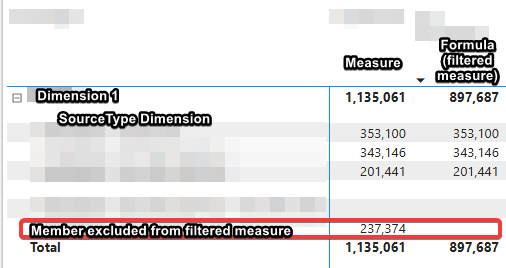
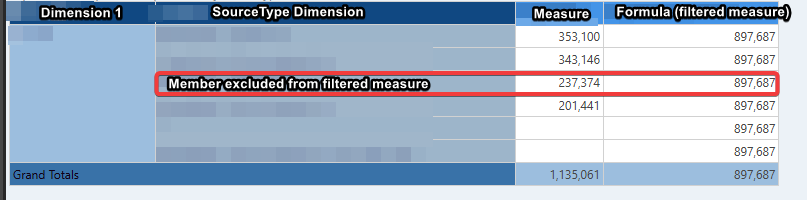
       Thanks.  Here's a screenshot from Discovery as well as a screenshot of the same thing in PowerBI which is what I'm trying to achieve.

      In Pyramid, the formula (filtered measure) doesn't take the row context into account, thus produces the same output for all members (the total 897,687)


      In PowerBI the formula for the filtered measure is

      Filtered Measure = CALCULATE(COUNT(EventsTable[EventKey]),SourceTypeTable[SourceTypeKey]<>1)
      

      When this is dropped into a matrix, the filtered measure first takes the row context into account and then applies the filter in the formula.  The output is the same as "raw" measure for each member except for the member that is excluded.


      • imbarmarinescubar_pyram
      • 7 days ago
      • Reported - view

      Hi  

      You can write the same kind of expression in Pyramid:

      count(if([SourceTypeTable].[SourceTypeKey]=1, null, [EventsTable].[EventKey]))
      • Michael_Connelly
      • 5 days ago
      • Reported - view

       Thanks for this, it worked for a count but for a sum, it didn't work with a measure.  For example

      sum(if([SourceTypeTable].[SourceTypeKey]=1, null, [measures].[EventsTable Cost]))

      I also tried

      aggregate(if([SourceTypeTable].[SourceTypeKey]=1, null, [measures].[EventsTable Cost]))

      The only way I could get it to work was by exposing Cost as an attribute

      sum(if([SourceTypeTable].[SourceTypeKey]=1, null, [EventsTable].[Cost]))

      Is there a better way to do this?  Thanks again for the help.

      • imbarmarinescubar_pyram
      • 3 days ago
      • Reported - view


      Correct. Notice that this type of expression is creating a calculated column and then wrapping it with an aggregation.
      It cannot use pre-aggregated columns, which is what a measure is. That's why you needed to expose the attribute and use in instead of the measure.
      You can create this directly in the model, instead of the logic app, which will allow you to use [EventsTable].[Cost] without exposing it. Create a calculated column with the IF expression, and wrap it with the sum measure (as you would do with any other column).
      A completely different approach is to create a custom measure which is referring to the aggregated values. Note that this will work when the SourceType is in the report:

      if([SourceTypeTable].[SourceTypeKey].currentMember.caption = "1", null, [measures].[EventsTable Cost])

      Keep in mind that if you are using this approach and you're also using Totals in the report, that you should probably change the totaling logic to by SUM instead of AGGREGATE.

    • Brendan_Conway
    • 6 days ago
    • Reported - view

    Ahh thanks for the visual and extra context - I see what you're looking for now.  Looks like Imbar has you covered, but let us know if you need anything else.
Content aside

  • Status Answered
  • 3 days agoLast active
  • 6Replies
  • 48Views
  • 4 Following